Kitchen Inventory KDP Interior: A Practical Print-Ready Tool for Organized Food Tracking
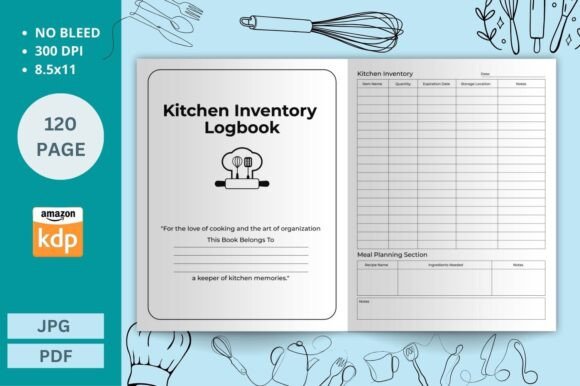
For home cooks managing weekly meal prep, small-scale caterers juggling seasonal ingredients, or apartment dwellers minimizing food waste, consistent inventory tracking is less about perfection and more about intentionality. The Kitchen Inventory KDP Interior is a purpose-built printable resource designed to support that intention—without requiring software subscriptions, app logins, or complex setup. It’s not a digital dashboard or cloud-based system; it’s a 120-page, ready-to-print interior file optimized specifically for Amazon Kindle Direct Publishing (KDP), with flexibility built into its structure.
What Sets This Interior Apart From Generic Planners or DIY Templates
At its core, the Kitchen Inventory KDP Interior provides structured, consistent fields across every page: item name, current quantity, expiration date, purchase date, and optional notes. Unlike broad-use bullet journals or generic spreadsheet templates, this interior assumes a kitchen-specific workflow. Each entry line supports quick visual scanning—critical when you’re mid-recipe or restocking after grocery day. The layout avoids decorative flourishes that reduce usable space, prioritizing legibility and functional density.
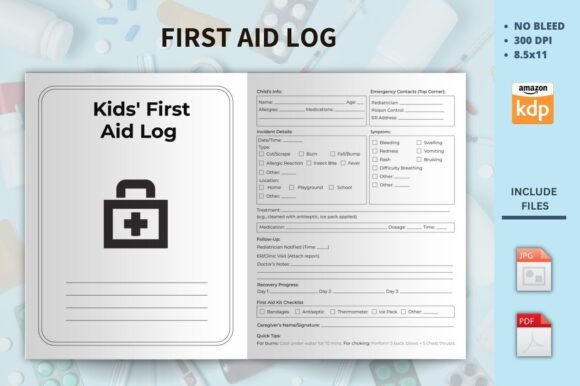
The technical specifications reinforce its practicality: 8.5″ x 11″ size with no bleed, 300 dpi resolution in both PDF and JPG formats, and KDP-tested formatting. That means if you're compiling a low-cost physical planner to sell on Amazon—or printing a personal copy at home—the pages align correctly, text remains crisp, and margins comply with KDP’s print requirements. You can adjust page count up or down without compromising layout integrity, making it adaptable whether you need a compact 60-page version for pantry-only tracking or an expanded 180-page edition covering freezer, dry goods, and cleaning supplies.
How It Compares With Other Inventory Approaches
Digital tools offer real-time syncing and automated alerts—but they also introduce friction: needing Wi-Fi, remembering passwords, toggling between apps, or trusting third-party data policies. A well-designed spreadsheet gives flexibility but demands manual column management, formula upkeep, and consistent file naming. In contrast, the Kitchen Inventory KDP Interior eliminates those layers. It’s static, tactile, and distraction-free. You write once, refer often, and update only when physically handling items—aligning naturally with habits like unloading groceries or checking pantry shelves.
Compared to handwritten notebooks or loose-leaf logs, this interior offers consistency. There’s no guessing whether last month’s entries fit the same format as this week’s. Page numbering, uniform spacing, and standardized headers mean your records remain comparable over time—valuable when reviewing usage patterns or identifying recurring shortages. And unlike many printable PDFs found on design marketplaces, this interior has been verified across multiple KDP print runs, reducing risk of margin cutoffs or font rendering issues.
Strengths in Real-World Use
- Low cognitive load: No learning curve. If you can read and write, you can use it immediately—no tutorials, settings menus, or onboarding screens.
- Privacy by default: Data stays offline unless you choose to scan or transcribe it elsewhere.
- Adaptable scope: Works equally well for tracking spices in a studio apartment or bulk grains in a shared commercial kitchen prep area.
- Print-and-go reliability: High-resolution files ensure clean lines and readable type even on standard home printers or local print shops.
Where Tradeoffs Become Relevant
The Kitchen Inventory KDP Interior doesn’t auto-calculate totals, generate reports, or send reminders. If you rely heavily on forecasting (“How much rice will I use before the next delivery?”) or need barcode scanning, it won’t replace dedicated inventory software. Similarly, if your workflow depends on sharing updates across multiple people in real time—say, a restaurant manager updating stock levels while staff restocks—you’ll need collaborative features this interior doesn’t provide.
It also assumes a certain level of routine. Someone who shops infrequently or rotates ingredients rarely may find the structure more detailed than necessary. In those cases, a simpler checklist or single-page pantry map might serve better. Likewise, users who prefer visual cues—like color-coded categories or icons for allergens or storage zones—would need to add those manually, since the interior uses a clean, neutral design focused on clarity over customization layers.
Fitting the Tool to Your Needs
Consider the Kitchen Inventory KDP Interior when your priority is simplicity, consistency, and control—not automation. It fits well for:
- Home cooks building a zero-waste habit: Tracking expiration dates helps prevent tossing half-used jars of tahini or forgotten cans of chickpeas.
- Meal preppers batching recipes weekly: Cross-referencing quantities against planned meals reveals gaps before shopping begins.
- Small business owners launching a cottage food operation: Maintaining basic supply logs supports compliance with local health guidelines—even without full-scale inventory software.
- Educators or life skills instructors: Its clear layout works well as a teaching tool for teens or adults learning independent living skills.
Conversely, look elsewhere if you need integration with point-of-sale systems, multi-location sync, or advanced analytics like usage rate trends over six months. Those capabilities require platforms built for scale—not static printables.
Practical Customization Without Technical Barriers
“Customizable” here means actionable, not abstract. You can insert your own category tabs (e.g., “Baking Staples,” “Freezer Items”) using a standard printer or binder. You might highlight high-turnover items with a colored pen, add stickers for priority alerts, or staple supplementary pages for seasonal inventory bursts—like holiday baking supplies or summer produce hauls. Because the PDF is layered cleanly and fonts are embedded, minor edits in Adobe Acrobat (like adding a header line or adjusting column width) remain stable across devices.
This isn’t customization through code or drag-and-drop editors—it’s customization rooted in how people actually work: annotating, reordering, adapting on paper. That grounded approach makes it resilient across contexts, from a dorm room desk to a catering van’s glovebox.
Making an Informed Choice
Choosing a kitchen inventory method isn’t about finding the “best” option overall—it’s about matching the tool to your environment, habits, and goals. The Kitchen Inventory KDP Interior excels where stability, accessibility, and minimal setup matter most. It doesn’t try to be everything. Instead, it does one thing well: giving you a dependable, printable framework for keeping track of what you have, how much remains, and when it needs replacing.
If you value consistency over automation, privacy over connectivity, and tangible records over cloud backups, this interior offers a tested, flexible foundation. But if your needs center on collaboration, forecasting, or integration with other systems, evaluating digital alternatives—or hybrid approaches combining printed logs with periodic spreadsheet summaries—may better serve your long-term workflow.
Ultimately, the right inventory system is the one you’ll actually use—not the one with the most features. The Kitchen Inventory KDP Interior removes common barriers to consistent tracking, letting you focus on cooking, planning, and reducing waste—not troubleshooting software or redesigning templates.